


Huck's Bucks Bigg Rewards
4.0645.00 Reviews
App Specs
- Version
- 43.01.01
- Updated On
- License
- Free
- Downloads
- 100,000+
- Developer
- Hucks
- Categories
- Food & Drink
- Platform
- Android
Screenshots
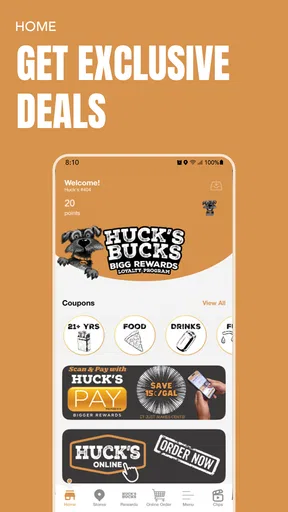
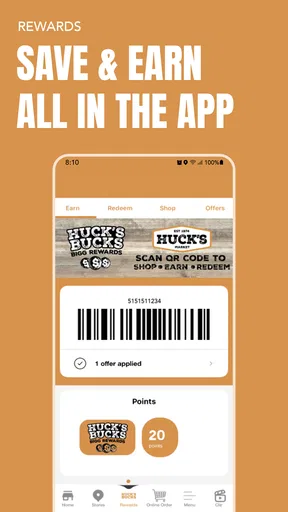
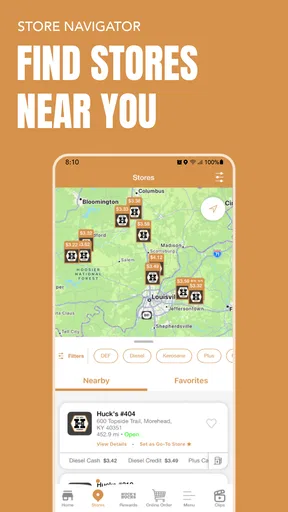
 Analysis by AppCompare
I approached Huck's Bucks Bigg Rewards as a practical question rather than a quick download: does a dedicated rewards app make everyday Huck’s visits easier and more worthwhile than relying on memory, paper promotions, or a general-purpose loyalty wallet? After spending time with this Food & Drink app, my answer is fairly clear. It is most useful when Huck’s is already part of your routine, while it is much less compelling if you only stop there occasionally or prefer to keep every reward program in one place.
The app is free, comes from Hucks, and is built around the Huck’s Bucks rewards experience. Its store summary welcomes users to that rewards program, while the short description keeps the idea simple: Huck’s Bucks. That simplicity is both its appeal and its limitation. You are not downloading a broad restaurant guide or a general shopping assistant. You are choosing a focused companion for one brand’s rewards system.
Its current version is 43.01.01, and it supports devices running Android 7.0 or later. The listing shows a 4.0 average from around 1.9 thousand ratings, with more than 100 thousand installs. Those figures suggest a real user base without making the app feel like an all-purpose platform. The content rating is Mature 17+, which is worth noticing before installation, particularly if you are setting up a device for a younger family member.
How I would decide whether it belongs on your phone
My first decision criterion would be frequency. If you visit Huck’s for fuel-stop snacks, drinks, meals, or other regular purchases, a dedicated rewards app has a reasonable chance of earning its place on your home screen. The more often you use the same participating brand, the less effort each visit needs to justify the app. If your visits are random, the benefit becomes harder to feel because you must remember the app at exactly the moment you are paying.
The second criterion is attention. Rewards apps work best when you are willing to check them before a purchase, keep the relevant account ready, and notice what is available. I would not treat this as a completely invisible savings tool. It is better understood as a small routine: open it when planning a Huck’s stop, review the current rewards area, and use the app during checkout when appropriate.
The third question is whether you want a brand-specific experience. A dedicated app can be clearer than a general loyalty wallet because it does not have to organize unrelated stores, restaurants, and memberships. On the other hand, every additional rewards app creates another login, another notification stream, and another account to maintain. That trade-off matters more than the download itself.
There is also a practical device question. Android users on an older phone should check the operating-system requirement before trying to install it; Android 7.0 is the minimum listed version. That is not an issue for most current devices, but it can matter on an older spare phone used for travel or work. I would also consider the Mature 17+ label before recommending it to a teenager simply because it is connected to food and convenience-store purchases.
Worth Reading Before You Choose

EA SPORTS FC Mobile 26 Is a Bigger Football Game, but It Takes Time

Flipboard Shows What News Apps Must Do Beyond the Feed

Switching to Android Auto Means Rethinking Your Driving Routine

Google Calendar Makes a Crowded Week Easier to Manage

Ludo King Makes the Most of the Minutes Between Plans

Baby Panda World Brings Quick Play to Modern Phones, but Its Game Library Feels Busy
The everyday routine where it makes sense
Imagine a weekday morning when I am already stopping at Huck’s for coffee and something quick to eat. Without a dedicated rewards tool, I might pay and drive away without thinking about loyalty benefits. With this app installed, I can make checking it part of the stop: look before leaving home, keep the account ready, and avoid trying to search through email or a crowded wallet while standing at the counter.
That workflow is more valuable than it sounds because the best rewards experience is usually the one that removes hesitation. I do not want to study a complicated system while a line forms behind me. I want to know whether using the app is relevant to this visit, then complete the purchase without turning a snack run into an administrative task.
A second useful scenario is a regular driver who makes several short stops during a week. In that case, the app can serve as a reminder that purchases at the same place may be connected through one rewards account. I would check it at a calm moment rather than opening it only after I have reached the register. That small habit reduces the chance of forgetting the app or missing the chance to use the program.
Where the dedicated Huck’s approach wins
The strongest advantage is focus. Because the app is specifically tied to Huck’s Bucks, I do not have to sort through unrelated restaurant cards or generic coupons to find the program I actually use. For a regular customer, that narrower purpose can be more convenient than a broad rewards app that tries to cover everything.
It also gives the rewards relationship a clear home. Instead of treating loyalty as a paper receipt, a mental note, or a message buried in an inbox, I can return to one app when I want to think about Huck’s purchases. That is particularly helpful for people who prefer digital organization and already keep their phone close during errands.
The real strength is routine, not novelty. I would not install this expecting entertainment or a large collection of unrelated food tools. I would install it because a focused rewards app can make repeat visits easier to manage. That distinction helps set realistic expectations and prevents the common disappointment of downloading a loyalty app that does not match your shopping habits.
Another advantage is decision speed. A general-purpose alternative may require opening a wallet, locating the correct brand, and then checking whether the account is active. A dedicated app starts with the relevant brand already in view. That does not guarantee that every visit will produce a benefit, but it can make the process more direct.
There is a less obvious benefit for people who split their time between routine stops and occasional trips. I can check the app before traveling through an area where Huck’s is familiar to me, rather than assuming I will remember everything once I am on the road. The best use is still simple: prepare before the transaction, not while distracted by traffic, luggage, or a busy checkout.
What I would check before relying on it
A rewards app is only useful if I can remember to use it and if the checkout process feels dependable in real conditions. That means I would test the complete routine during a low-pressure visit before making it central to my spending habits. I would install it, sign in if required, explore the available account area, and make sure I understand what I need to present or activate at purchase time.
I would also avoid assuming that installing the app automatically changes every transaction. Loyalty programs commonly depend on the correct account, an eligible purchase, or an action taken before payment. Since those details can affect the result, I would read the in-app instructions carefully and keep expectations modest until I have completed a successful visit.
Phone readiness matters too. If I am driving, I would handle the app before arriving rather than trying to operate it at the pump or in a queue. A rewards tool should save effort, not create a distraction. I would keep the device charged and make sure I know where the app is located, especially if I use several payment and membership tools.
Notifications are another point of friction. I tend to be selective with alerts, so I would review the app’s notification behavior and decide whether reminders are genuinely helpful. A rewards app that I ignore because it sends too many irrelevant prompts is not serving me well. Conversely, turning everything off may mean I need to remember to check the app manually.
How it compares with the usual alternatives
The closest alternative is not necessarily another app. For an infrequent customer, doing nothing may be the better choice. If I visit Huck’s only once every few months, the mental cost of maintaining another rewards account may outweigh the occasional benefit. In that situation, I would rather keep my checkout simple than collect programs I rarely use.
A paper-based approach can also suit someone who dislikes app accounts. Paper is visible and does not depend on a phone battery, but it is easier to lose and harder to organize. The dedicated app is the better fit for me when I want one digital place for the Huck’s rewards relationship, while the paper option may feel more comfortable for someone who prefers physical records.
General loyalty wallets are attractive when I regularly use many different brands. They reduce the number of separate applications on my phone and may make a broad collection of memberships easier to find. Their weakness is focus: the Huck’s experience becomes one card among many. I would choose a wallet when consolidation matters more than brand-specific clarity.
Payment apps and banking tools offer another comparison. They are useful for tracking spending, but they are not automatically a substitute for a dedicated brand rewards experience. A payment record can tell me where I spent money, while a rewards app is intended to connect me with the brand’s loyalty process. If my main goal is budgeting, I would use the financial tool; if my goal is managing Huck’s Bucks, I would use the dedicated app.
I would not expect this app to replace a general food-discovery service either. Someone looking for restaurant recommendations, broad menus, delivery choices, or meal planning should look elsewhere. This is a narrow utility for Huck’s customers, and its value comes from that narrowness rather than from trying to become a complete food platform.
The cost of switching from another rewards habit
Moving to a dedicated app has a small but real setup cost. I need to install it, create or access the right account, understand the checkout routine, and remember to use it. If I already rely on a general wallet, I may also need to change where I look before paying. None of this is difficult, but it is enough to make a casual user abandon the process after one forgotten visit.
My advice is to switch gradually. I would not delete a familiar alternative immediately. I would use the Huck’s app on several normal visits, confirm that it fits my routine, and then decide whether the older method is still necessary. This staged approach protects against the most common loyalty-app mistake: removing the backup before learning the new workflow.
Account organization deserves attention. If more than one person in a household visits Huck’s, I would decide in advance whether everyone uses one account or maintains separate access. Sharing credentials casually can create confusion about who completed a transaction or which phone should be used. I would keep the arrangement simple and avoid making one person responsible for remembering the app for everyone.
I would also treat the app as a convenience, not as a reason to buy things I did not want. Rewards can make repeat purchases feel more organized, but they should not encourage unnecessary spending. My rule would be straightforward: use the program for visits already in my routine, not to justify extra stops.
Who should install it, and who should skip it
I would recommend trying it to a regular Huck’s customer who wants a focused digital rewards tool and is comfortable using a phone during everyday errands. It is also a sensible choice for someone who repeatedly forgets paper promotions or wants to check the Huck’s program before leaving home.
I would be more cautious with occasional visitors, people who dislike maintaining separate brand accounts, and anyone looking for a broad food app. Those users may get more value from a general loyalty wallet, a simple payment tracker, or no rewards app at all. The right choice depends less on the app’s existence than on whether Huck’s appears often enough in your weekly routine.
For older Android phones, I would verify compatibility first because the app requires Android 7.0 or later. For younger users, I would pay attention to the Mature 17+ content label rather than assuming that a food-and-drink category automatically makes an app suitable for every age group.
The public response is reasonably encouraging: the app holds a 4.0 average from around 1.9 thousand ratings and has accumulated more than 600 written reviews. I read that as evidence that many people find the concept useful, not as a promise that every device, checkout, or personal routine will feel identical. A rating is a starting signal; my own decision would still depend on frequency and convenience.
My recommendation after weighing the trade-offs
My recommendation is conditional but positive. If Huck’s is one of the places I visit regularly, I would install Huck's Bucks Bigg Rewards and give it a fair trial during ordinary purchases. The free price removes the main financial barrier, and the focused design makes more sense than a broad alternative when one brand dominates my routine.
I would begin by setting up the app at home, reviewing the rewards area without rushing, and using it on the next planned Huck’s visit. I would then judge it on three practical questions: did I remember to open it, did the checkout process feel clear, and did it make the visit easier rather than slower? Those answers are more useful than downloading it simply because every rewards program seems worth having.
My final view is that this is a purpose-built loyalty companion, not an essential food app for everyone. It wins through brand focus, repeat-use convenience, and a straightforward reason to return. It loses some appeal when visits are rare, when I want one universal wallet, or when I dislike managing separate accounts. For the right Huck’s customer, that is a fair trade. For everyone else, skipping it is a sensible decision rather than a missed opportunity.
Pros
- Simple interface makes offers easy to browse and understand.
- Reward options give users flexibility when redeeming accumulated points.
- Regular promotions can increase the value of everyday purchases.
- Account tracking helps users monitor points and redemption progress.
- Useful for loyal customers who frequently shop with participating brands.
Cons
- Rewards may be limited to specific stores
- locations
- or participating products.
- Points can expire or be subject to changing program conditions.
- Some offers may require receipts
- codes
- or extra steps to qualify.
- The app’s usefulness depends heavily on how often you visit partner businesses.
- Reward availability and redemption values may vary over time.
FAQs for Huck's Bucks Bigg Rewards
What is Huck's Bucks Bigg Rewards?
Huck's Bucks Bigg Rewards is the loyalty app for participating Huck’s Market and convenience-store locations. After creating an account, you can use the app to view available rewards, track loyalty activity, find nearby stores, and access promotions that may be linked to your purchases. The exact benefits can vary by location, account status, and the current offers available in the program.
How do I earn and redeem rewards in the app?
Rewards are generally earned by identifying your loyalty account when making eligible purchases at participating Huck’s locations. Depending on the promotion, this may involve scanning a digital membership ID, entering a phone number, or meeting specific purchase requirements. Once an offer becomes available, review its terms carefully, including expiration dates and participating products, before attempting to redeem it at checkout.
Is Huck's Bucks Bigg Rewards free to download and use?
The app is typically free to download, and joining the loyalty program does not usually require a paid subscription. However, downloading the app may use mobile data, and some rewards require qualifying purchases. Offers, fuel discounts, product promotions, and program rules can change, so it is worth checking the in-app details and the terms shown during registration before relying on a particular benefit.
Does the app work at every Huck’s location?
Not necessarily. Huck’s Bucks Bigg Rewards is intended for participating Huck’s stores, but available features and promotions may differ between locations. Before making a purchase specifically to earn or redeem a reward, use the store locator or confirm with the cashier that the location supports the offer. Regional restrictions, temporary exclusions, and product availability may also affect redemption.
What information is required to create an account, and is my data safe?
Registration may ask for details such as your name, email address, phone number, and other information needed to manage your loyalty account. The app may also process purchase or location-related data to provide rewards and personalized promotions. Before signing up, read the current privacy policy and permissions carefully. Only enable location access or notifications if those features are useful to you.


